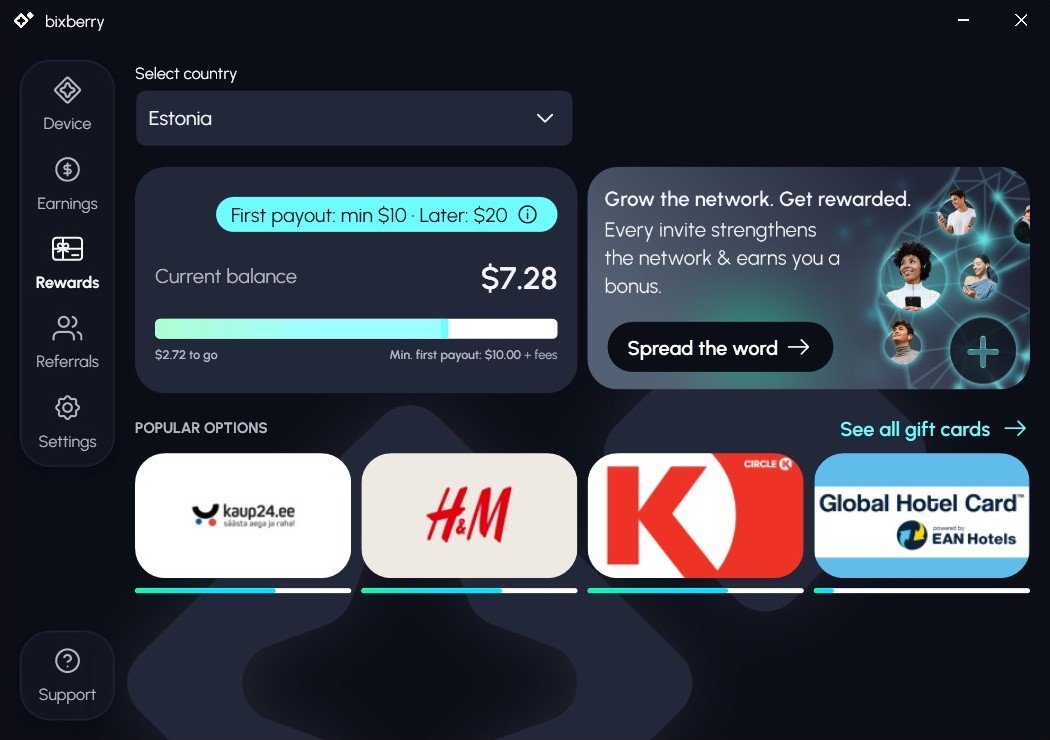
Bixberry is a phone and desktop app that rewards you for letting AI assistants use your idle internet connection to fetch fresh data from the web. After six weeks my balance is $7.28: $3.00 is a welcome bonus for joining through an invite, and $4.28 was earned by my phone. The first payout starts at $10, so I haven’t tested a withdrawal yet — I’ll update this review once I reach the threshold.
What is Bixberry
Bixberry is run by UAB “Cloudsquad”, a Lithuanian company based in Vilnius; the app launched in 2026. It’s a DePIN platform: users share their device’s resources, and the company sells access to the network to its clients. Here the clients are AI companies that need to check prices, opening hours, news and other data “through the eyes” of a regular user in a specific country.
I signed up on 14 September 2026 on an Android phone. Since 22 October I’ve kept the app running non-stop, and in my experience earnings picked up. On 24 October a Windows version arrived, and I connected the same account on my computer.
How it works and what you earn for
The app runs in the background and routes small requests from AI companies through your connection: loading a page, checking a price or a listing. According to the website, there are more than 17 partners, each vetted before being connected. The company says the app does not read your files, messages or browsing history.
Your balance comes from three sources:
- Online time — for keeping the device connected and available to the network. There’s a standard rate and a premium 2x rate; my computer on home internet got the premium rate straight away.
- AI requests powered — for every request routed through your connection.
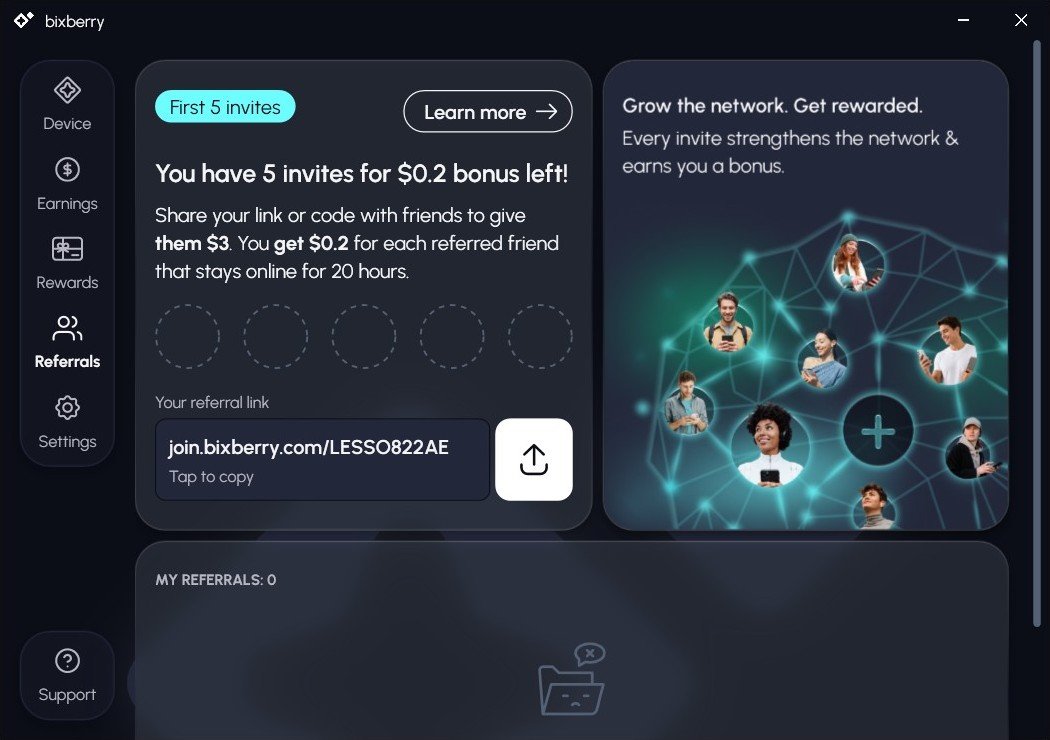
- Referral program. A newcomer who joins through an invite gets $3 to start. The person who invited them gets $0.20 for each friend who stays online for 20 hours. Right now this bonus applies to the first 5 invites.
The company doesn’t publish its rates: earnings depend on your country and connection quality. Under the terms, rates can change, but credited earnings are not recalculated.
| Parameter | Terms |
|---|---|
| Company | UAB “Cloudsquad”, Vilnius, Lithuania |
| Devices | Android, iOS, Windows; macOS coming soon |
| Multiple devices | phone and computer can share one account, stats are combined; the number of devices is limited by the rules |
| Account | one per person |
| Welcome bonus | $3 when joining through an invite |
| Referral bonus | $0.20 after the friend’s 20 hours online, for the first 5 invites |
| First payout | from $10 + fees, then from $20 |
| Payout method | gift cards, 5,000+ brands, chosen by country (popular in Estonia: kaup24.ee, H&M, Circle K, Global Hotel Card); the card arrives by email |
| Payout partner | GIFQ (Gift Quest OÜ, Estonia) |
| Age | 18+ only |
| Balance expiry | expires after 6 months of inactivity; a balance above the threshold stays valid for 24 months |
Sources: Bixberry website, terms of service, GIFQ announcement.
My results as of 24 October 2026
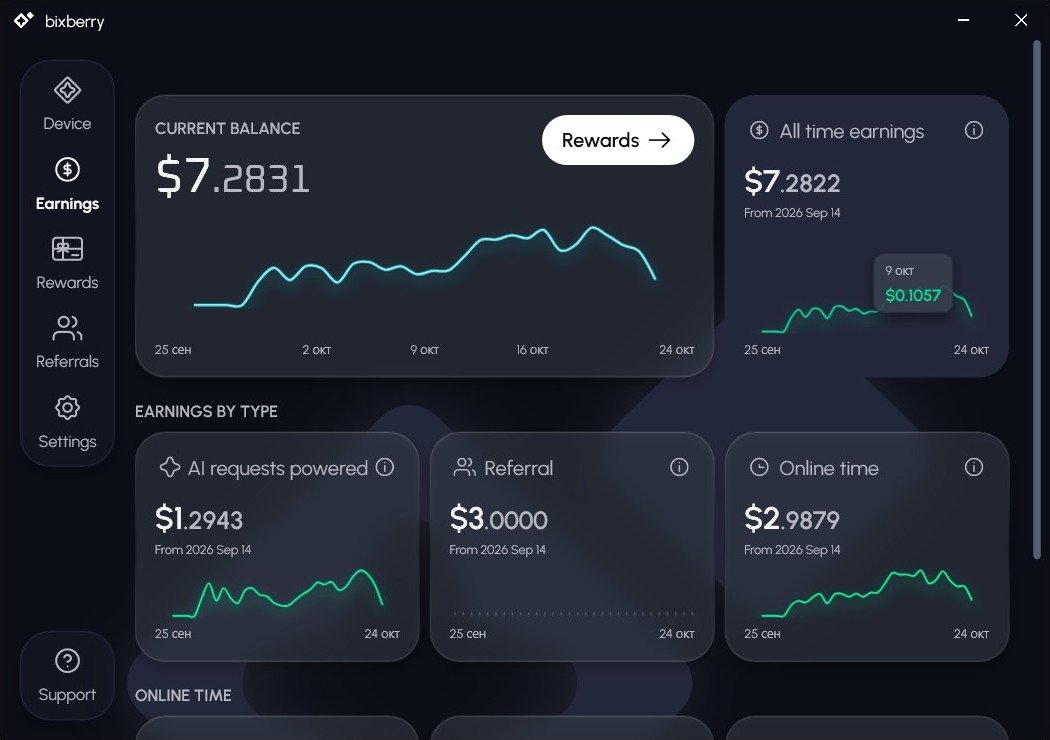
From 14 September to 24 October my phone earned $4.28, plus the $3.00 welcome bonus. I need $2.72 more to reach the first payout.
| Metric | Value |
|---|---|
| All time earnings | $7.2822 |
| Online time | $2.9879 |
| AI requests powered | $1.2943 |
| Welcome bonus (Referral line) | $3.0000 |
| Friends invited | 0 |
| Average online time, last 30 days | 17.4 hours per day |
| Left to first payout ($10) | $2.72 |
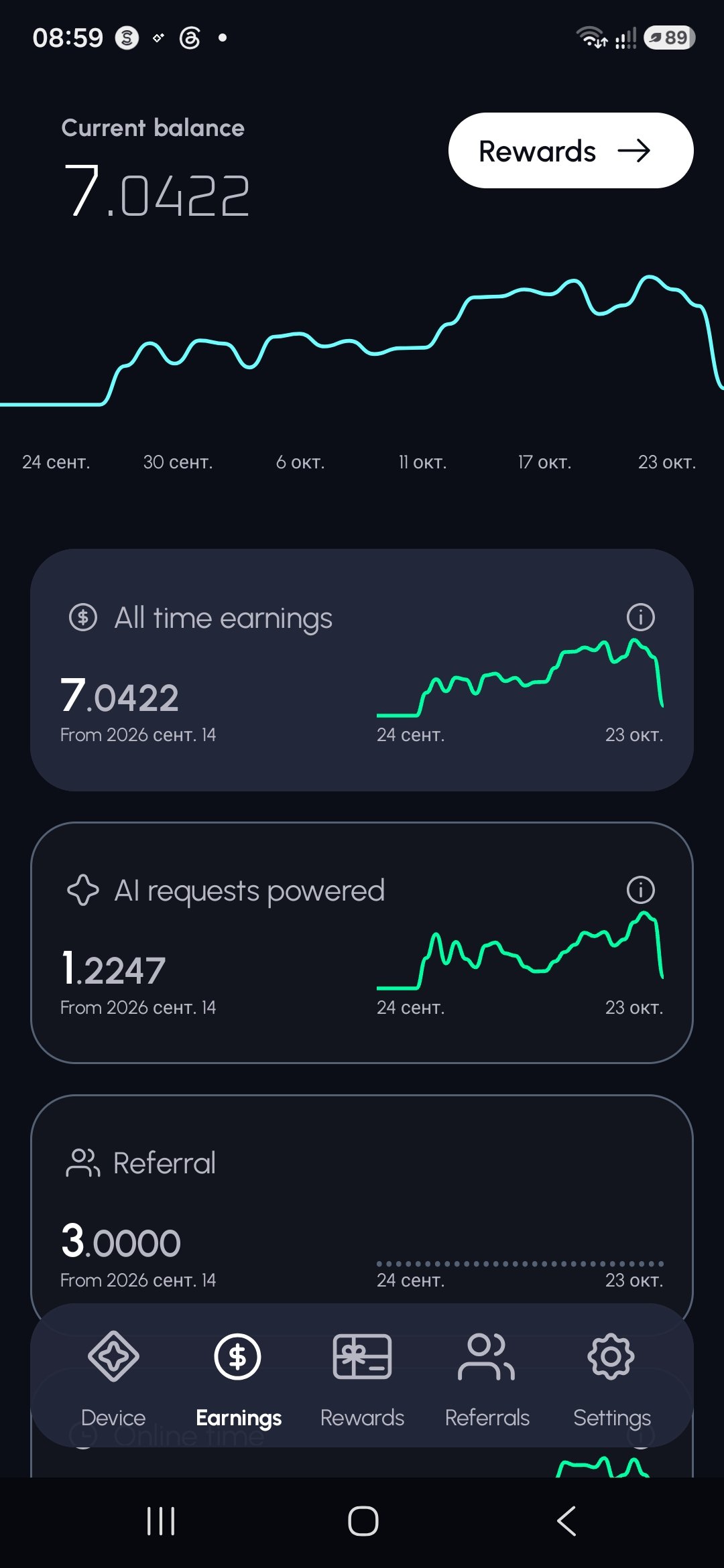
What the chart shows:
- There were almost no earnings in the first two weeks; noticeable growth started at the end of September.
- Since mid-October daily earnings have been higher than at the start.
- The drop at the end of the chart is the current day, which isn’t over yet.
Counting from the end of September, my phone earned about $0.15 per day, or roughly $4–5 per month. For example, on 9 October it earned $0.1057. This is an estimate for one device in Estonia: in another country and on another connection the numbers will differ.
Computer. On 24 October I connected the Windows version to the same account. On home internet the computer got the premium 2x rate right away (169 ms response time) and powered 3 AI requests in its first 4 minutes. I’ll add how much it earns per day after a week.

It’s best not to close the app or kill it in memory. The company itself says that on Android earnings grow if you turn off battery optimization for it.
How to get started
- Follow my invite link — you’ll get $3 to start. Install the app from Google Play or the App Store, and the Windows version from the website for your computer.
- Sign in with Google or email. Gift cards are sent to this email, so use an address you check regularly.
- On your phone, choose a mode: Wi-Fi only, or Wi-Fi and mobile data. I recommend Wi-Fi only to start.
- On Android, allow background activity and turn off battery optimization for Bixberry. On iOS the app will ask for “Always” location access — the company says it’s only used to confirm your region.
- Keep the app running and check your balance in the Earnings section. Once you reach $10 plus fees, pick your country and a card in the Rewards section.
You’ll find your invite link in the Referrals section. You get $0.20 for each friend who stays online for 20 hours — for the first 5 invites.
Don’t create a second account or install the app on devices you don’t own. A phone and a computer can share one account, but the number of devices is limited. Breaking the rules can cost you your balance.
Risks and limitations
The main risk isn’t the app itself but your contract with your internet provider. That’s why I plan to remove Bixberry from my phone after testing a payout.
- Provider terms. Bixberry’s rules require you to check your contract with your provider yourself. Many plans, especially business plans, forbid sharing the connection with third parties for commercial purposes. A breach can lead to throttling or disconnection.
- Your IP address. Other parties’ requests go through it. The company itself warns that you may see more captchas and some websites may block the address.
- Work and shared networks. You can’t use an employer’s, hotel’s, library’s or other shared network without explicit permission.
- Countries. The service is not available in Russia, Belarus, the temporarily occupied territories of Ukraine (Luhansk and Donetsk regions, Crimea), Cuba, Iran, North Korea or Syria.
- Low income. One device brings in a few dollars a month. Reviews on Google Play and Trustpilot also say earnings are small and the payout threshold is high.
- Young service. The app launched in 2026 and has 10K+ installs and about 90 ratings on Google Play (3.7 on average). Confirmed payouts in public sources are still few.
- Gift cards only. You can’t withdraw to PayPal, a bank card or crypto. Points are not money: the company can change the threshold and the rates.
- Battery and data. The company says usage is similar to an ordinary background app. On mobile data the traffic counts against your plan, so “Wi-Fi only” is the safer mode.
Verdict and plans
Bixberry looks honest on paper, but it’s a small income source: about $4–5 a month from one phone. A computer on home internet with the premium 2x rate could speed things up noticeably — I’m testing that now. The company openly names its legal entity and payout partner and is upfront about provider risks. But I haven’t tested a payout yet.
My plan:
- Reach $10 plus fees and order the first card.
- Update this review with a payout screenshot: how long it took, which card, what fee.
- Add how much the computer earned in a week.
- After the payout, remove the app from my phone (my mobile plan is a business plan).
- Check my home internet contract and decide whether to keep Bixberry on my computer.
Who it suits: people with stable home Wi-Fi whose contract allows this kind of use, and who are happy with gift cards. Who it doesn’t suit: anyone looking for meaningful income, or living in a restricted country.
FAQ
How much can you earn? I get about $0.15 a day from one phone in Estonia. Rates depend on your country and connection.
How do you withdraw? Only as gift cards: the first time from $10 plus fees, then from $20. The card arrives by email.
Can I connect both a phone and a computer? Yes, to one account, with combined stats. The number of devices is limited, and a second account is not allowed.
What happens if I stop using it for a while? If the app hasn’t been used for more than 6 months, the balance expires.
Is my data safe? The company says it doesn’t read files, messages or browsing history, and that traffic is encrypted. This hasn’t been independently verified. The IP address risk is described above.
Disclosure
The Bixberry link in this article is my invite link. If you sign up with it, you get $3 to start and I get $0.20 once you’ve been online for 20 hours. Your terms don’t change. This is not financial advice: check your contract with your internet provider before you start.